Complete Old Photo Restoration: Bring Vintage Memories Back to Life in 2026
Restore faded vintage photos with AI face enhancement, automatic damage repair, and color revival. Bring precious old memories back to life.
Munib Ali Laghari
Founder & Lead Developer
Quick answer
How do you restore an old photo with AI?
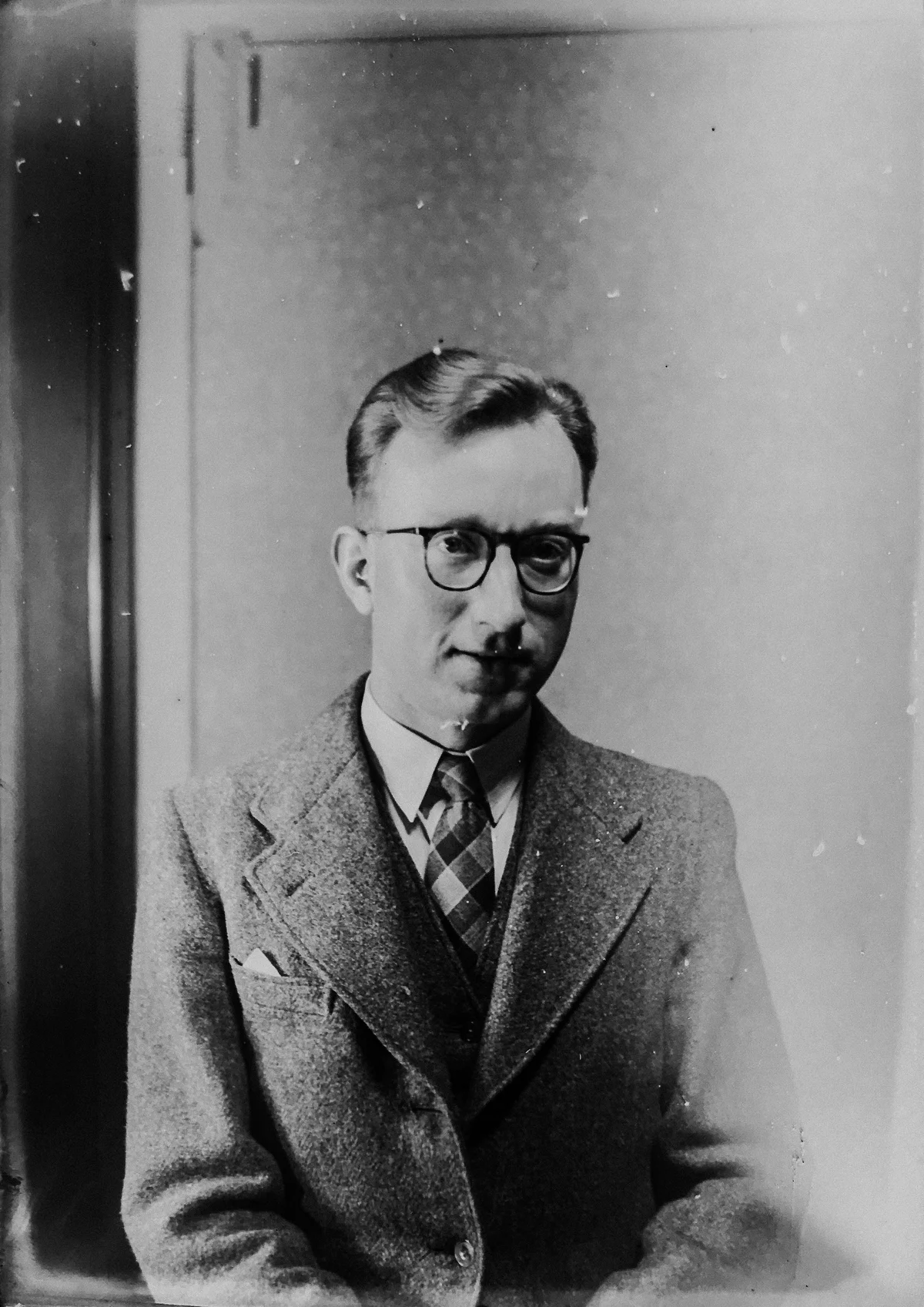
AI photo restoration repairs scratches and tears, reverses fading, sharpens faces, and can colorize black-and-white prints automatically. Upload a scan and the model rebuilds lost detail in seconds. It works on photographs from any era, including heavily damaged and faded originals.
Before
After
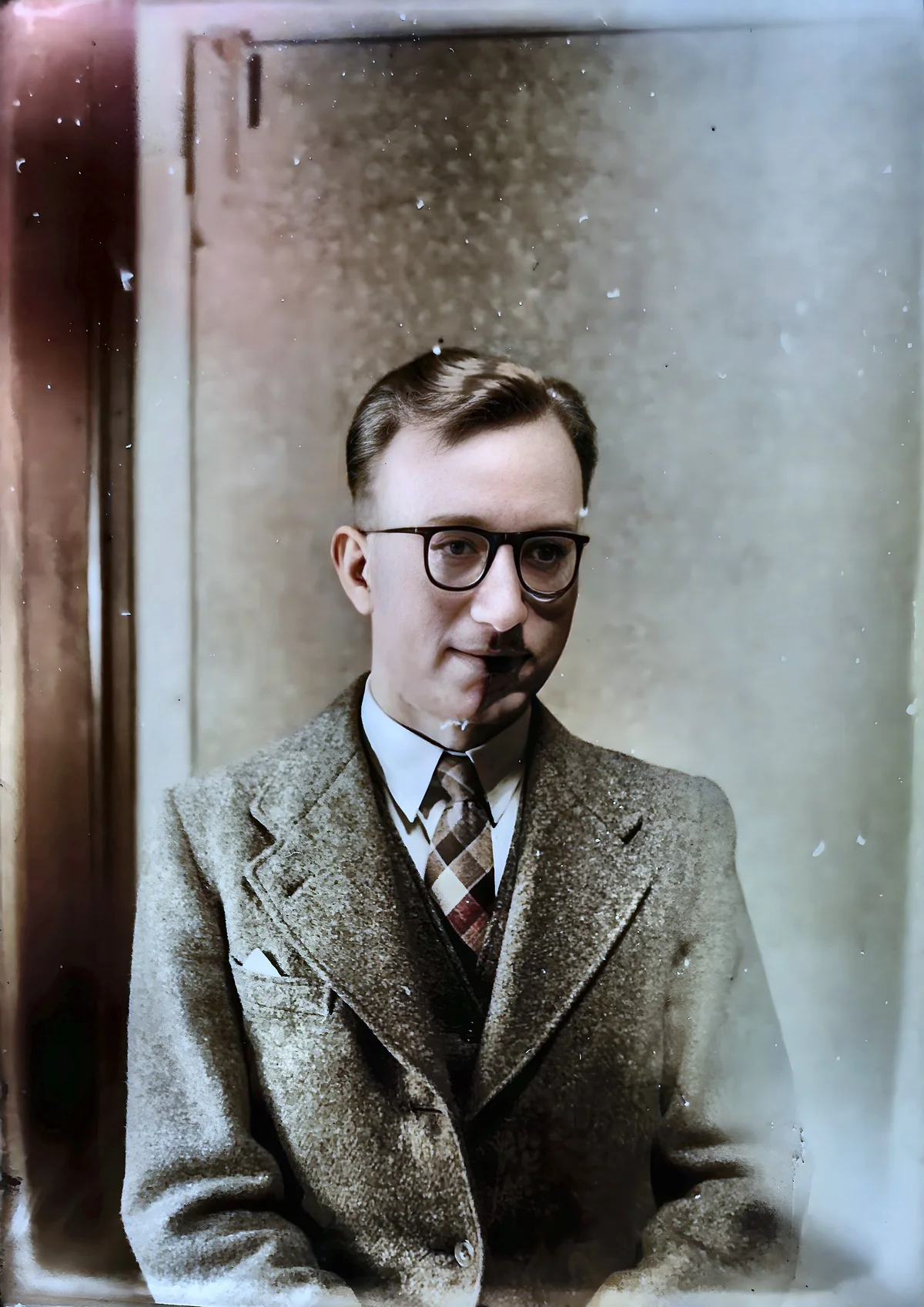
More examples like this: browse before & after results across every tool.
You open the family photo album and there they are—your grandparents on their wedding day, your parents as children, relatives you never got to meet. But the photos themselves are heartbreaking. Faces have faded to barely visible shadows. Colors that were once vibrant have washed out to pale ghosts of their former selves. Scratches cut across important details. Tears and creases mark decades of handling. Water stains bloom across cherished moments. Time has not been kind to these irreplaceable memories.
Traditional photo restoration requires expert skills in photo editing software. You'd need to manually retouch faces pixel by pixel, painstakingly clone and heal every scratch, laboriously adjust colors region by region. Professional restoration services charge hundreds of dollars per photo. Even if you attempt it yourself, each image could take hours of careful work—and the results depend entirely on your artistic skill and technical expertise.
AI-powered old photo restoration transforms this process entirely. Comprehensive algorithms handle face enhancement, damage repair, and color revival all in one intelligent workflow—bringing decades-old photos back to life in minutes rather than hours or days.
The Degradation Problem: Time's Toll on Memories
Old photographs suffer from multiple simultaneous degradation types that compound over time. Photographic prints begin to fade noticeably after 25–50 years without archival storage (Library of Congress), while color photographs lose up to 40% of their dye density within 30 years under typical household storage conditions — meaning most family photo collections are in active decline right now.
Old photographs suffer from multiple simultaneous degradation types, each one stealing more of the original image quality. Understanding what's destroying your photos helps you appreciate how comprehensive AI restoration can fix them all.
Fading faces are perhaps the most heartbreaking loss. The photographic emulsion deteriorates over time, and facial details—the most important part of family photos—fade first. Eyes lose definition, expressions become unclear, and the people you're trying to remember become indistinct shadows. In extreme cases, faces are barely visible against the background, reducing irreplaceable portraits to near-uselessness.
Color degradation affects every old color photograph. Dyes fade unevenly—usually reds and yellows go first, leaving photos with heavy cyan or blue color casts. Saturation drops until vibrant scenes look washed out and lifeless. Color shifts create unnatural tones where skin looks wrong and familiar scenes look alien. The emotional warmth of the original moment is drained away by chemical deterioration.
Physical damage compounds over the years. Scratches from mishandling cut across important details. Tears from rough storage or accidents destroy portions of images. Creases from folding create permanent damage lines. Water stains from floods, leaks, or humidity bloom across surfaces. Dust and dirt embedded in the emulsion create permanent speckling. Each type of physical damage removes information that seemed lost forever.
Print deterioration affects the paper itself. Yellowing and age spots alter the overall tone. The emulsion cracks and flakes, creating missing regions. Adhesive damage from being stuck in albums pulls away pieces of the image. Mold and mildew create stains and texture changes. The physical medium is failing along with the image it holds.
Storage damage from years in less-than-ideal conditions adds its own problems. Light exposure fades portions of images unevenly. Temperature fluctuations accelerate chemical degradation. Humidity promotes mold and adhesion problems. Simply being stored for decades takes its toll, regardless of how careful the storage conditions were.
The result is photos that captured important moments but can barely show them anymore. Family history that should be vivid and clear is instead faded, damaged, and deteriorating further with each passing year.
How Comprehensive AI Restoration Works
AI old photo restoration addresses all degradation types simultaneously — face enhancement, damage repair, and color revival — in a single automated pipeline that would take professional restorers hours to perform manually. Most AI processing completes in 10–15 seconds per image, making it practical to restore entire family archives in an afternoon.
AI old photo restoration tackles all these problems simultaneously with an intelligent multi-stage approach that addresses each type of degradation appropriately.
Face enhancement uses specialized AI trained specifically on human faces to restore faded facial features. The algorithm identifies faces in the image regardless of how faded they've become. It then reconstructs facial details based on understanding of human anatomy and typical facial structures. Eyes regain definition and sparkle. Expressions become clear and readable. Skin tones are normalized. The unique characteristics that make this person recognizable are carefully preserved while damaged areas are intelligently restored. You control the enhancement level from subtle restoration to aggressive reconstruction depending on how degraded the faces are.
Automatic damage repair detects and fixes physical deterioration. The AI identifies scratches, tears, water stains, and other defects automatically. It then uses intelligent inpainting to fill these damaged areas by analyzing surrounding image regions. Scratches disappear as the algorithm reconstructs what should be underneath. Tears are seamlessly filled. Water stains are removed while preserving underlying details. The AI distinguishes between damage and actual image content, repairing the former while preserving the latter.
Color enhancement and revival brings life back to faded colors. The AI analyzes the overall color balance and detects characteristic fading patterns. It then intelligently boosts saturation and corrects color shifts while maintaining natural appearance. Skin tones are carefully normalized to look natural rather than oversaturated. Scene colors are revived to vibrant but believable levels. The color boost slider (100-200%) lets you control how aggressively to enhance colors—subtle revival for moderately faded photos or dramatic enhancement for severely washed-out images.
These three processes work together synergistically. Face enhancement restores the emotional core of family photos. Damage repair removes distracting defects. Color revival brings back the vibrancy and warmth of the original moment. The result is photos that look the way they did when they were new—or even better, with modern processing that exceeds what was possible in the original era.
Real Transformations: Generations Restored
Approximately 3.5 trillion photos exist digitally as of 2024 (Keypoint Intelligence estimate), yet the oldest physical prints — the ones most worth preserving — remain locked in deteriorating albums. AI restoration is the most cost-effective way to rescue them before the damage becomes irreversible.
A woman was preparing a memorial display for her grandmother's 90th birthday celebration. She had dozens of family photos spanning seven decades, but the older ones were in terrible condition. The grandmother's own wedding photo from 1953 was so faded that her face was barely visible, with severe water damage and scratches across the entire image. Using complete AI restoration with maximum face enhancement, damage repair enabled, and strong color boost, the photo was transformed. Her grandmother's young face became clear and expressive, damage disappeared, and the faded sepia tones were revived into warm, natural colors. The restored photo became the centerpiece of the celebration, and family members were moved to tears seeing their matriarch as a young bride with such clarity for the first time in their lives.
A genealogy researcher had inherited a collection of family photos dating back to the 1890s. The oldest images—tin types and early prints—had deteriorated severely over 130 years. Faces were shadows, damage was extensive, and the photos seemed beyond saving. AI restoration brought them back from the brink. Face enhancement made long-dead ancestors recognizable as real people with expressions and character. Damage repair removed cracks, stains, and tears. Even though these were black-and-white photos, the color enhancement helped normalize tones and remove yellowing. The researcher could finally create a family tree illustrated with clear, dignified portraits rather than barely-visible fragments.
A military veteran wanted to restore photos from his service in Vietnam. The photos had been stored in tropical humidity for years, then decades more in an attic. Mold damage, water stains, and extreme fading left his buddies' faces nearly invisible. The memories were precious, but the photos were failing. Comprehensive restoration rescued them. Faces of fallen comrades became clear again. Group photos where he'd almost forgotten who was who became identifiable. The damage that seemed permanent was repaired. He created a memorial book with the restored images, preserving not just the photos but the memories and the people they represented.
An antique dealer acquired an estate with hundreds of family photos from the early 1900s. The photos had historical value, but their condition made them unsellable. Systematic AI restoration of the entire collection transformed degraded relics into beautiful period photographs. Clear portraits of people from a century ago, vivid images of historical scenes, family moments preserved with dignity—all restored to professional quality. The restored collection sold to a historical society for archival preservation, ensuring these glimpses into the past would survive for future generations.
Controlling Your Restoration: Three Key Settings
The three key settings — face enhancement level, auto-repair toggle, and color enhancement — work together to target each type of degradation independently, giving you precise control over how aggressively each problem is addressed. Color photographs lose up to 40% of their dye density within 30 years, so even moderately old color photos typically benefit from color enhancement settings of 50–70%.
The power of comprehensive restoration comes from intelligent defaults combined with adjustable controls for different situations.
Face Enhancement Level (0-100%) controls how aggressively to restore faded faces. At 0%, faces are left as-is with no enhancement—useful if faces are already clear and you only need damage repair and color work. At 50%, moderate enhancement restores definition while maintaining a natural, period-appropriate look—perfect for photos where faces are faded but not completely gone. At 100%, maximum face reconstruction brings back extreme detail even from severely faded images—the right choice when faces are barely visible shadows that need aggressive restoration.
Auto-Repair Damage (On/Off toggle) enables automatic detection and fixing of scratches, tears, and stains. Turned off, only face and color enhancement occur—appropriate when photos are in good physical condition but just faded. Turned on, the AI actively seeks and repairs physical damage—essential for images with scratches, water stains, tears, or other defects. Use this cautiously on photos with intentional textures or artistic elements you want to preserve, but for typical damaged family photos, enabling auto-repair is transformative.
Color Enhancement (0-100%) controls saturation and color balance restoration. At 0%, colors remain unchanged—useful for black-and-white photos or when you want to preserve the aged look. At 20-30%, subtle enhancement adds life without looking unnatural—good for moderately faded photos. At 50-70%, strong enhancement dramatically revives washed-out colors—the sweet spot for typical old color photos. At 100%, maximum boost creates vibrant, contemporary-looking colors—use when colors are almost completely gone and you want maximum revival.
Start with moderate settings (50% face enhancement, damage repair on, 50% color boost) and adjust based on your specific photo's needs. Preview the results and fine-tune each setting independently until you achieve the perfect balance for that particular image.
Where Old Photo Restoration Shines
Family Archives and Genealogy
Personal family photo collections contain irreplaceable memories that deserve preservation. Restore wedding photos from grandparents and great-grandparents. Revive childhood photos of parents and relatives. Bring clarity to family gathering photos from decades past. Create restored digital archives that will outlast the deteriorating originals. Share clear, beautiful images with family members rather than apologizing for poor quality.
Historical Preservation
Historical societies, museums, and archives hold photos documenting local and national history. Restore these images for displays, publications, and digital archives. Make historical figures recognizable and relatable. Preserve documentation of events, places, and people before the photos deteriorate beyond saving. Create high-quality reproductions for educational materials.
Memorial and Tribute Purposes
Funeral services, memorial displays, and tribute videos deserve the best possible photos of the person being honored. Restore old photos to their former glory so the person looks their best. Create beautiful memorial prints from faded originals. Compile life story presentations with professionally restored images throughout.
Personal Heritage Projects
Family history books, heritage scrapbooks, and genealogy presentations benefit from professionally restored photos. Create coffee table books with restored family photos spanning generations. Build family tree displays with clear, dignified portraits. Preserve your heritage in a format that future generations can appreciate and enjoy.
Technical Tips for Best Results
Scanning Quality Matters
If you still have physical photos, scan them properly before restoration. Scanning at 600 DPI captures more detail for the AI to work with — and since color photographs lose up to 40% of their dye density within 30 years, scanning sooner rather than later preserves more information for the restoration algorithm to recover. Use at least 300 DPI, but 600 DPI captures more detail for the AI to work with. Clean the photo surface gently before scanning to remove dust. Scan in color even if the photo is black-and-white—color scans capture more information. Save scans in lossless formats like TIFF or PNG rather than compressed JPEG.
Restoration Order for Multiple Problems
If photos have multiple issues, address them strategically. For very noisy scans, denoise first before old photo restoration. For low-resolution scans of small photos, consider upscaling before restoration to give the AI more pixels to work with. For photos with both severe damage and fading, comprehensive restoration handles both simultaneously—no need to use other tools first.
Saving Your Results
After restoration, save in high-quality formats to preserve the work. PNG is perfect for archival storage—lossless quality that won't degrade. For sharing or web use, high-quality JPEG (95-100%) maintains excellent quality with reasonable file sizes. Keep both the original scan and the restored version—you may want to try different restoration settings later.
Combining with Other Tools
After basic restoration, you might want additional enhancements. If the restored image is still low-resolution, upscale it for large prints. If specific damaged areas weren't fully repaired by auto-repair, use inpainting tools for targeted fixes. For black-and-white photos, colorization works better on a restored photo than on a damaged original — it's built into the same restoration tool, so run it as one pass rather than colorizing first.
The Emotional Power of Restoration
Old photo restoration isn't just a technical process—it's emotional archaeology. These images represent people, moments, and stories that matter. When a faded face becomes clear again, you're not just improving image quality—you're connecting with family history in a way that wasn't possible before.
Children and grandchildren can finally see what their ancestors looked like with clarity. Stories about "Grandpa's infectious smile" make sense when you can actually see the smile. Family resemblances become obvious when faces are clear. The past stops being abstract and becomes personal and real.
For older family members, seeing restored photos of their youth or their departed loved ones can be profoundly moving. The way they remember people—young, vibrant, full of life—suddenly matches the photos again instead of contradicting them. Memories are validated and enhanced.
Ready to Restore Your Memories?
Upload any old, faded, or damaged photo and watch comprehensive AI restoration bring it back to life. Face enhancement reveals expressions and features time had stolen. Automatic damage repair removes scratches, tears, and stains. Color revival brings back the vibrancy and warmth of the original moment.
Your family history deserves to be preserved with clarity and beauty. Those irreplaceable moments deserve to look as good as they did when the shutter clicked decades ago. The people who matter to you deserve to be remembered clearly, not as faded shadows.
Try our old photo restoration tool now and bring your precious memories back to life.
Found this helpful?
Share it with your network
Ready to try it yourself?
25 free credits to start, then 10 every month. No credit card. Process your first image in under 15 seconds.
Try Photo Restoration freeMunib Ali Laghari
Founder & Lead Developer · EnhanceCraft
Munib Ali Laghari is the founder and lead developer of EnhanceCraft, an AI image toolkit. He writes about AI upscaling, photo restoration, and background removal. Connect on LinkedIn