AI Image Denoising: Remove Noise and Artifacts for Crystal-Clear Photos in 2026
Remove digital noise, JPEG artifacts, and graininess from photos with AI. See how denoising restores clarity and sharpness without changing resolution.
Munib Ali Laghari
Founder & Lead Developer
Quick answer
How do you remove noise from a photo with AI?
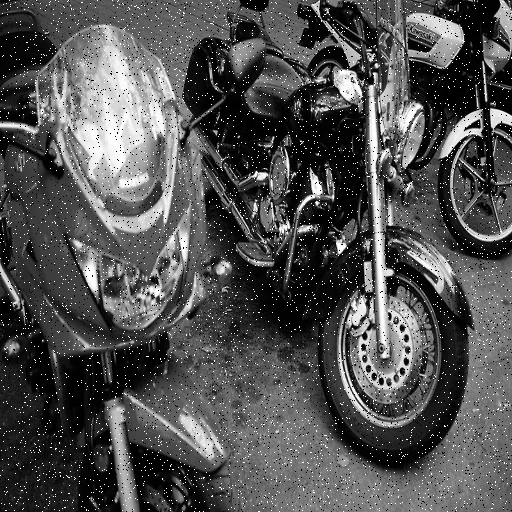
AI denoising separates real image detail from grain, ISO noise, and JPEG artifacts, then removes only the noise. Unlike blur filters that smear texture, it keeps edges and fine detail sharp, so low-light and high-ISO photos come out clean rather than soft. EnhanceCraft offers adjustable denoising strength.
Before
After
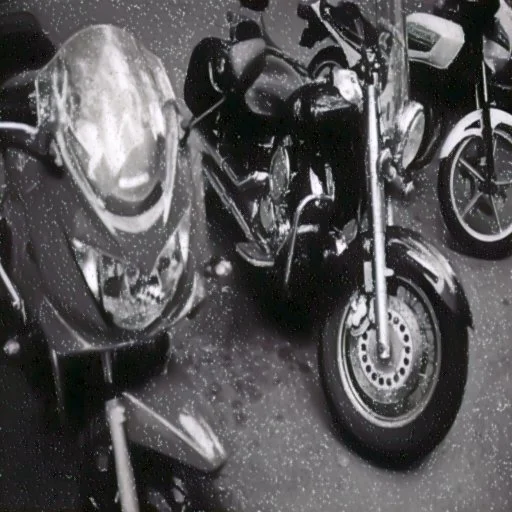
More examples like this: browse before & after results across every tool.
The wedding ceremony was beautiful. The lighting was terrible. You pushed your camera's ISO to 6400 to get the shot, and now those precious moments are covered in ugly digital noise—colored specks and grain that make the entire image look amateur. Or maybe you downloaded product photos from a supplier, only to discover they're heavily compressed JPEGs with blocky artifacts everywhere. Perhaps you're scanning old family photos and the scanner noise is making everything look grainy and harsh.
Traditional solutions don't work well. Simple blur filters remove noise but also destroy detail, leaving you with soft, mushy images that look worse than the originals. Manual noise reduction in photo editors requires expert skills and hours of painstaking work. Aggressive denois settings turn skin into plastic and eliminate texture entirely. You're stuck choosing between noisy photos that look unprofessional or over-processed images that look artificial.
AI-powered denoising solves this elegantly. Advanced neural networks can distinguish between noise and actual image detail, removing the unwanted artifacts while preserving—and even enhancing—the quality you want to keep.
The Noise Problem: More Than Just Grain
Digital noise degrades images in several distinct ways — ISO noise, JPEG compression artifacts, scanner grain, and sensor patterns — each requiring a different type of correction. ISO 3200 and above introduces visible luminance noise in most consumer cameras, while smartphone sensors (10–25x smaller than full-frame DSLRs) generate noise at even moderate sensitivity settings.
Digital noise comes in many frustrating flavors, each one degrading your images in different ways. Understanding what you're fighting helps you appreciate how AI denoising works its magic.
ISO noise is what photographers dread most. When you shoot in low light and crank up your camera's sensitivity, the sensor amplifies not just the light signal but also the electronic noise. The result is that characteristic grainy texture and color speckling that makes high-ISO shots look amateurish. The noise is especially visible in darker areas and uniform regions like sky or walls. What should be smooth becomes mottled with random color and brightness variations.
JPEG compression artifacts plague web images and over-compressed photos. Those blocky squares (8x8 pixel blocks) appear where smooth gradients should be. "Mosquito noise"—shimmering pixels around edges—makes text and sharp transitions look terrible. Color banding replaces smooth gradients with visible steps. The image takes on a crunchy, digital quality that screams "low quality."
Scanner noise affects anyone digitizing prints or film. Even high-quality scanners introduce grain and color noise, especially when scanning at high DPI or from challenging originals. The noise compounds any existing film grain or print texture, making digital versions look worse than the originals. Old prints with faded emulsion pick up even more noise during scanning.
Sensor noise patterns from older cameras or smartphones create fixed-pattern noise, hot pixels, and color casts that degrade every image from that device. Cheaper cameras often have more noise across all ISO settings, limiting their usability for professional work.
The combined effect is images that look unprofessional, distracting, and lower quality than the moment deserved. Fine details get lost in the noise. Smooth areas become textured. Colors look muddy instead of pure. The emotional impact of your photo is diminished by technical flaws.
How AI Separates Signal from Noise
AI denoising separates genuine image detail from noise by analyzing local image regions and distinguishing between random variation (noise) and intentional texture — something impossible for traditional blur-based filters that treat all variation the same. This means you get cleaner images without the artificial smoothness that conventional denoising produces.
Traditional denoising algorithms use simple mathematical filters. They look at local pixel areas and try to smooth variations. But they can't tell the difference between noise and texture—they just blur everything and hope for the best. That's why traditional denoising destroys details while trying to remove noise.
AI denoising is fundamentally different. Neural networks trained on millions of clean and noisy image pairs have learned what real image details look like versus what noise looks like. The AI can analyze your photo and make intelligent decisions: "This grainy texture in the sky is noise—remove it. This grainy texture in the fabric is actual fabric texture—preserve it."
The technology works in multiple stages. First, noise detection analyzes the image to identify types and levels of noise present. Different algorithms handle luminance noise (brightness variations) versus chrominance noise (color speckling) versus compression artifacts. The AI examines local image regions to understand what should be smooth versus what should be detailed.
Then comes selective noise reduction. The AI removes noise from appropriate areas while leaving detail intact. Smooth regions like sky get aggressive denoising. Textured areas like fabric or hair get lighter treatment. Edges are identified and sharpened rather than blurred. Fine details are actively preserved even while surrounding noise is eliminated.
Finally, detail enhancement brings back clarity. Because the AI isn't just blur filtering, it can actually sharpen and enhance details once noise is removed. The result is images that are simultaneously cleaner and sharper—something impossible with traditional techniques.
What makes this truly remarkable is how it handles real-world images. Mixed-content photos with both smooth areas and detailed regions get appropriate treatment for each zone. High-noise images that would be impossible to salvage manually come out looking professional. JPEG artifacts that normally require pixel-level manual retouching simply disappear.
Real Success Stories: From Noise to Clarity
Poor image quality is cited by 22% of consumers as a reason to distrust an online store (Salsify 2023 Consumer Research), which means noisy, artifact-ridden product photos do more than look unprofessional — they actively cost sales.
A wedding photographer shot an evening ceremony in a dimly lit church. To capture the moment without flash—which was forbidden—she pushed to ISO 6400. The shots were exactly what she wanted compositionally, but the noise was severe. Colored specks everywhere, grainy texture making skin look terrible, shadows filled with ugly artifacts. Traditional noise reduction in her editing software turned skin into plastic and made everything soft. AI denoising cleaned up the noise while maintaining skin texture, fabric detail, and image sharpness. She delivered a full gallery of pristine images the clients loved, and they never knew there was any quality issue with the originals.
An e-commerce business received product photos from overseas suppliers. The images were heavily compressed—small file sizes for easier transmission, but JPEG artifacts everywhere. Blocky compression, color banding, loss of fine product details. The photos looked cheap and unprofessional on the website, directly impacting conversion rates. Running the entire catalog through AI denoising eliminated the compression artifacts, sharpened product details, and made everything look like it was photographed professionally. Customer complaints about image quality dropped to zero, and the cleaner product photos actually increased sales.
A genealogy researcher was digitizing family photos dating back to the 1960s. The prints were old and faded, and scanning them at high resolution to capture every detail also captured scanner noise, dust, and film grain artifacts. The digital versions looked worse than the originals—grainier and harsher. AI denoising cleaned up the scanned noise while preserving the actual photographic details. Faces became clear, expressions readable, and the digital archive finally did justice to the precious originals.
A nature photographer specializing in birds faced a constant problem: telephoto wildlife photography often requires high ISOs for fast shutter speeds. Her stunning bird shots came with frustrating noise in the background sky and foliage. Manual denoising in editing software was time-consuming—she'd spend 20-30 minutes per image trying to clean backgrounds without affecting feather detail. AI denoising automated the process. Backgrounds became clean and smooth, feather texture stayed perfect, and editing time per image dropped to under a minute.
Getting Perfect Results with AI Denoising
The best denoising results come from matching the enhancement level to the specific problem — light processing for modest ISO noise, maximum enhancement for severely compressed images or high-ISO shots above ISO 6400. Most AI image enhancement completes in 10–15 seconds per image at full resolution, so iterating to find the right level is fast and practical.
The beauty of modern AI denoising is the control it gives you. Rather than a simple on/off switch, you get an enhancement level slider (0-100%) that lets you dial in exactly how much processing to apply.
Light enhancement (0-30%) works perfectly for images that just need a subtle cleanup. Maybe there's slight noise from moderate ISO settings, or minor JPEG compression that you want to smooth. Light processing removes noticeable flaws while keeping the image looking completely natural. This is your setting for already-decent images that just need a final polish.
Moderate enhancement (40-70%) is the sweet spot for typical problem images. Noticeable ISO noise, clear JPEG artifacts, scanner grain—all get effectively removed while image details remain crisp. Most photos benefit from settings in this range. It's aggressive enough to make a visible difference without risk of over-processing.
Maximum enhancement (80-100%) tackles severe problems. Extreme high-ISO noise, badly compressed images, damaged scans—situations where the image seems barely salvageable. Maximum processing applies aggressive noise removal and strong detail sharpening. The results can be dramatic, transforming nearly unusable images into professional quality. However, use caution—very high settings on images that don't need them can introduce slight artificial-looking smoothness.
The key is matching the setting to your specific image. Start at 50-70% for most images and adjust based on results. If the image still looks noisy, increase. If it's starting to look too smooth or processed, decrease. Preview the results before applying to find the perfect balance.
Where AI Denoising Excels
High-ISO Photography
Low-light shooting becomes viable without expensive professional gear. According to a PPA survey, 53% of professional photographers report losing billable work due to technically flawed images — and high-ISO noise is one of the leading culprits. Concert photography, wedding receptions, indoor events—situations where ISO climbs to 3200, 6400, or higher. The noise that made these shots unusable becomes cleanable. You can shoot in challenging light with confidence, knowing cleanup is possible in post-production.
Compressed Images and Web Photos
Downloaded images from the web, compressed social media photos, client-supplied materials—all suffer from JPEG artifacts. AI denoising rescues these images, making them suitable for professional use. That perfect stock photo you found but couldn't use because of compression? Now it's viable.
Scanned Photos and Documents
Digitizing prints, film, or documents introduces scanner artifacts and amplifies existing grain. AI denoising cleans up the digital version without losing the detail you scanned to preserve. Family photo archives, historical document preservation, artwork digitization—all benefit from noise-free scans.
Smartphone Photography
Phone cameras are amazing but their small sensors generate noise, especially in anything but perfect light. Night mode photos, indoor shots, zoom photography—all can be cleaned up significantly. Your phone photos can look as clean as DSLR shots.
Video Frame Extraction
Pulling still frames from video often yields noisy, compressed images. Streaming video, security footage, screen recordings—the stills you extract are usually plagued with artifacts. AI denoising makes video frames usable as photographs.
Technical Advantages You'll Notice
Unlike simple blur-based denoising, AI processing doesn't reduce image resolution or sharpness. Your images remain crisp and clear—they're just cleaner. This means you can denoise first, then apply other enhancements like upscaling or face restoration without losing quality.
The processing preserves edges and fine details that matter. Hair strands stay sharp, text remains readable, fabric texture is maintained. The AI knows what to clean and what to keep.
Color accuracy is maintained throughout denoising. Removing chrominance noise doesn't shift colors or reduce saturation. Skin tones stay natural, product colors stay accurate, and the overall color balance remains true to the original.
Batch processing makes cleaning entire collections practical. Whether it's a wedding gallery with hundreds of shots, a product catalog with thousands of images, or a scanned photo archive, you can process everything with consistent quality.
Combining Denoising with Other Tools
AI denoising works best as part of a complete enhancement workflow. The order matters—clean the image first, then enhance it.
Denoise before upscaling to get the best results. If you upscale a noisy image, you're creating a larger version of the noise. Denoise first to clean the image, then upscale to increase resolution. The result is dramatically better than doing it in reverse order.
Denoise before face restoration for portraits. Clean images give face enhancement algorithms better source material to work with. The face restoration can focus on enhancing features rather than fighting noise.
Denoise after scanning but before other edits when digitizing photos. Make cleaning your first step, then proceed with color correction, cropping, or other adjustments on the clean base image.
For severely degraded images, consider multiple passes at different settings. First pass at moderate levels to remove gross artifacts, second pass at lighter settings to refine. This two-stage approach can handle images that seem hopeless with single-pass processing.
The Difference Clean Images Make
Noise isn't just a technical flaw — it actively degrades the viewer's experience and perception of quality. Images account for 50–70% of average webpage weight (HTTP Archive 2024), and when those images are also noisy or artifact-ridden, the dual penalty of slow loading and poor visual quality compounds the impact on conversions. Clean images look more professional, more trustworthy, more valuable. In e-commerce, that translates to higher conversion rates. In portfolio work, it means more client bookings. In personal memories, it means photos you're proud to display and share.
The emotional impact of a photograph comes through more clearly when viewers aren't distracted by technical flaws. A heartfelt portrait connects better when skin looks smooth and natural. A product photo sells better when the item looks crisp and clear. A landscape image feels more immersive when the sky is smoothly gradated rather than grainy.
AI denoising isn't about making flawed images acceptable—it's about unlocking the full potential of images whose quality was compromised by technical limitations. Your high-ISO wedding shots can look as clean as studio portraits. Your smartphone photos can match DSLR quality. Your scanned archives can look better than the originals.
Ready to Clean Your Images?
Upload any noisy, grainy, or compressed image and watch AI denoising transform it into crystal-clear quality. The technology intelligently removes noise and artifacts while preserving—and enhancing—the details that matter.
No more choosing between noisy photos and blurry ones. No more throwing away shots because of high ISO. No more settling for compressed quality because that's all you have. Just clean, sharp, professional images from any source.
If your photo suffers from atmospheric haze rather than sensor noise, the AI dehazer restores contrast and color in outdoor, drone, and landscape shots — and property photographers can run denoise, geometry, and color corrections together in the real-estate edit pack.
Try our AI denoising tool now and see your photos the way they were meant to look.
Found this helpful?
Share it with your network
Ready to try it yourself?
25 free credits to start, then 10 every month. No credit card. Process your first image in under 15 seconds.
Try Denoiser freeMunib Ali Laghari
Founder & Lead Developer · EnhanceCraft
Munib Ali Laghari is the founder and lead developer of EnhanceCraft, an AI image toolkit. He writes about AI upscaling, photo restoration, and background removal. Connect on LinkedIn